
The best way to Fix WiFi Signal issue in homes and offices using an old router to turn in signal booster mode. Make your old wireless router a repeater to extend your existing wifi signal to the area where low signal issues facing.
How to Fix WiFi Signal issue using Old WiFi Router
WiFi internet is available in every home today and required by everyone. Are you facing a Wi-Fi signal issue in your home and office? The signal issues can come when the Wi-Fi router is installed without a proper site survey and did not follow the router buying guide to choose the best WiFi router. After upgrading the WiFi router or installing the first router in the home still facing low signal issues in some areas is a common thing. If the home size is larger than a SOHO Wi-fi router not enough to cover the full Wifi signal in every area. WiFi signal issues can give you frequent WiFi disconnection issues and losing connectivity frequently. If you frequently face wifi connects with no internet issues you must use this method to improve signal quality to fix no internet issues.
Every internet provider installs a low-cost SOHO WiFi router with an internet connection which is not enough for a big house. You may also be facing a WiFi no-range problem in your home and be looking for Fix WiFi Signal issue. Today there are many WiFi range extender devices available in the market to boost Wireless signals in dark areas. Buying a range extender is a costly task when you are not aware of technical specifications.
However, the best way to fix the WiFi signal problem using the old Wifi router is the perfect solution which does not need any skill to setup the router in range extender mode. You can use an extra laying old WiFi router as wifi signal booster mode to fix the no coverage area in your home and office. In this post, you will get a simple manual to turn your router into a WiFi range extender to boost Wireless signal in a dark area.
How to use an OLD router as WiFi Signal booster
You can fix the WiFi Signal issue due to low range by using a range extender device or using a router as range extender mode. Most brands WiFi routers support multi wireless modes such as Access Point, Client, and Repeater mode. You can use the old router as repeater mode to extend your existing wifi range without adding extra access points.
What do you need to setup a router into a Signal booster?
1: WiFi router
2: LAN cable (for configuration)
3: PC/Laptop
Router connection with Laptop/ PC to Setup Repeater mode
To configure the Old router as extender mode need to access the software using a web interface.
Take your old router and see the default login IP Address and username password backside sticker.
If you did not find login details in the sticker find your router default settings here.
Most of the Router default IP address – 192.168.1.1 or 192.168.0.1
Username – admin
Password- admin
You can factory reset router to restore it in default mode using the reset button.
Take LAN cable and connect router LAN port one side and another side connect to PC/Laptop LAN port.
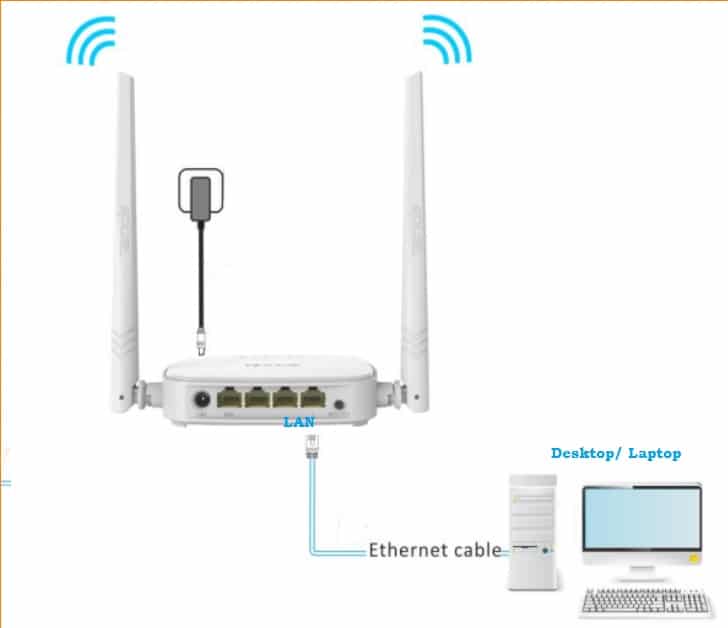
Go to PC Network settings and configure static IP as per router default series.
See steps to Configure PC/Laptop LAN IP Address.
Once everything is set now proceed to set up the router.
Login WiFi Router to change the Operation mode
Now open the web browser and access the router IP address and press the enter key.
Use the username and password for login.
Once the router login and enters settings now change the operation mode.
Find the Operation mode settings in the menu and choose the Operation Mode Range extender.
In some routers Operation mode will “Repeater” for Range extender mode.
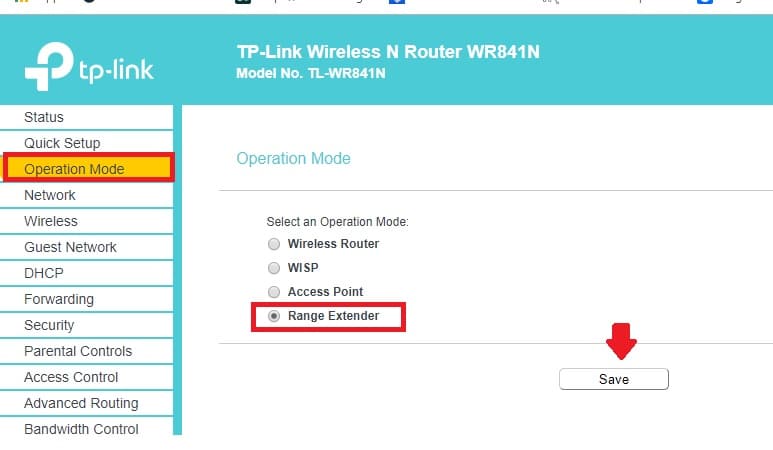
Choose and save mode.
Now Connect Range Extender Router to the Main WiFi router using the WiFi signal.
You need the main wifi password to connect the repeater device wirelessly without cable.
Go to Wireless settings– connect to wireless
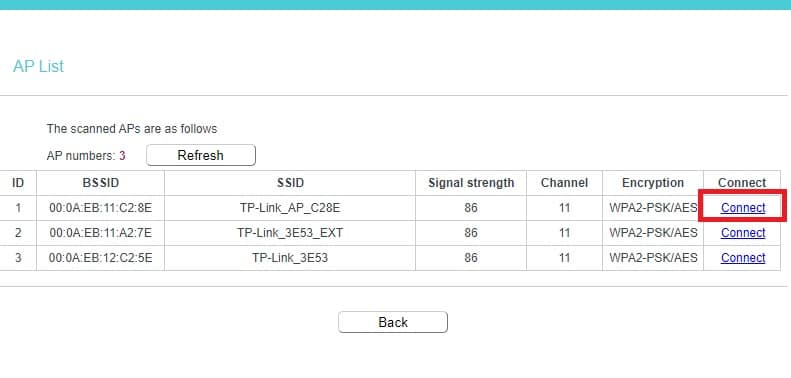
Press the scan button to search the main wifi SSID name to connect from the repeater device.
Make sure your router is near the main WiFi router so you can get the proper signals from the host router.
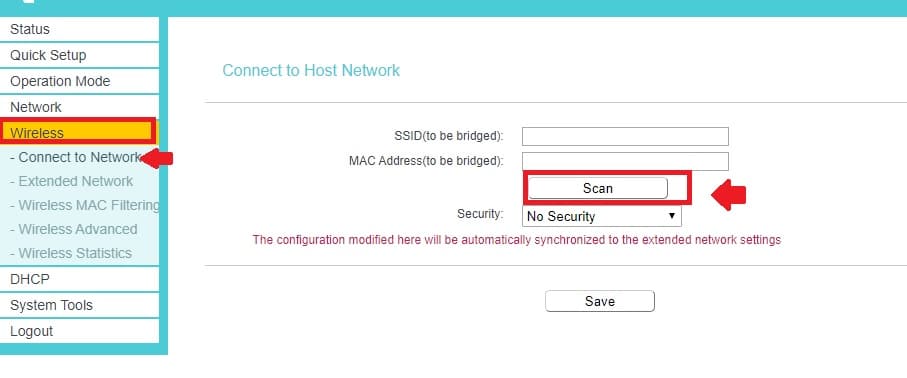
You will get all the running WiFi signals nearby.
Find your main WiFi name from the list and press connect button to join the network from the range extender device to extend the same network.
If you did not find your WiFi name then just refresh the scanning and check.
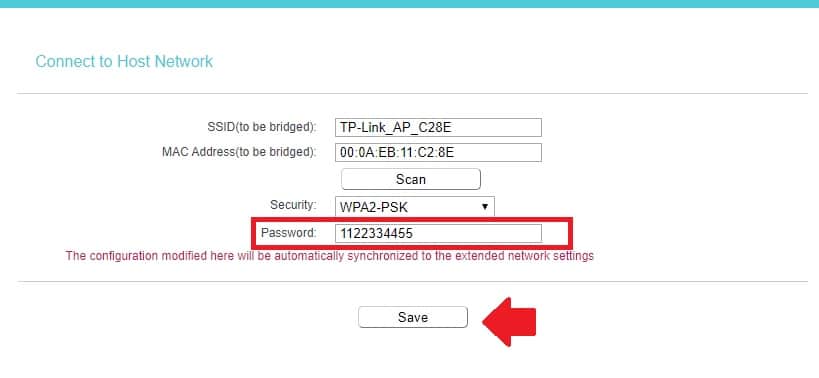
After joining the network provides the Wifi password to connect the range extender wirelessly.
Note: type the password of your main wireless router.
Press the Save button to apply settings and wait to reboot the device.
Save time depends on your router brand and models.
Once the extender is connected to the main WiFi router you will see the connection status.
Setup extended Network Name to boost the signal range
Now create the WiFi name for the extended network which will boost the WiFi range in the dark area where main WiFi coverage can’t reach.
You can use different names for extended networks or also can sesame name as our existing WiFi name.
Go to Wireless- Extended Network
Extended Network Settings
Extended 2.4 GHz SSID– type the name for the extended signal range. If you want to same wifi name as your main router then press the Copy host SSID button.
Extended 2.4 GHz security: WPA-PSK/WPA2-PSK (use always updated security type to protect your wifi name)
Extended 2.4 GHz Password: type the password in this box.
Note: Always use Alfa numeric key combination password to keep strong WiFi security.
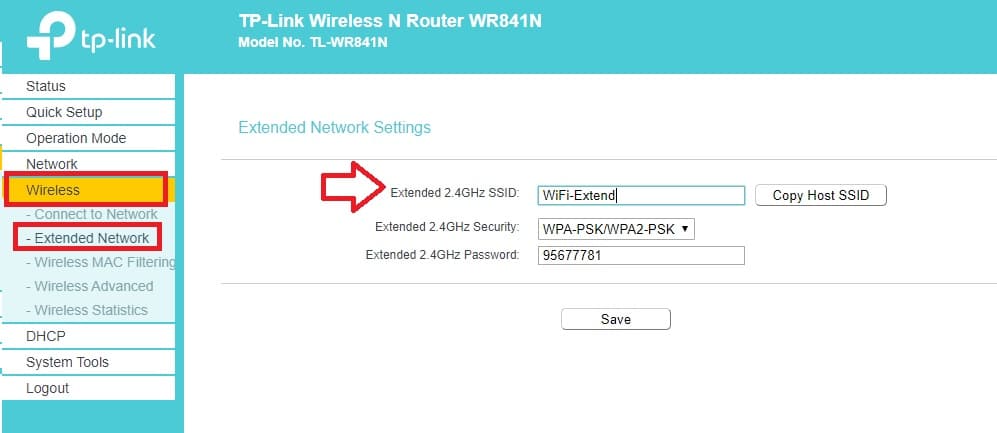
Press the Save button to apply settings.
If the router reboots then wait to finish reboot and now place your range extender router in the proper location.
Range Extender Router placement
Wifi range, Connectivity, and stability depend on the range extender placement. If the range extender is placed in a proper location where It can get 50% or more signal from the host router then your Wi-Fi signal range and WiFi speed will be always stable and fast.
Follow the Range extender Placement guide to select the best location for your extender router.
Final Word
Using an old Wireless router you can not only improve WiFi coverage but also use it as a WLAN adapter for your Xbox, NVR, Network printer, and Computer for wired connection. WiFi router supports many wireless modes which can use as per requirement and utilize your old laying router without investing single bucks. Apart from router mode, you can use Repeater, as the client, as WISP mode. The above steps can help you to solve poor wifi signal strength in your home and office and fix the no internet or limited connectivity issue in your home and office WiFi internet. Range extender mode best way to boost wifi signal on laptops and mobile.
You can use this method for TP-Link, Netgear, Tenda, D-Link, Toto link, and any other brand which supports Repeater mode in the WiFi router.
Related Post
- D-Link AC750 Dual Band WiFi Repeater Mode Setup
- OpenWRT WISP Repeater Mode Configuration
- Asus N300 WiFi Repeater Mode Setup
- iBall Baton 300M Repeater Mode configuration