
10.0.0.1 – 10.0.0.0.1 Login Xfinity Comcast
10.0.0.1 a popular default IP address used by Xfinity by Comcast to log in to all compatible brands router and cable modems to deliver Comcast services to the client end. Xfinity routers use the default login IP address 10.0.0.0.1 to access router for first time setup to activate Comcast service and post-activation you can access router settings to manage wireless name and password to secure your internet connections. If you have installed Xfinity Cisco DPC3941T DOCSIS 3.0 24×4 Wireless Residential Voice Gateway or Arris, Motorola, or any brand that is compatible with Xfinity service then you can use the 10.0.0.01 IP address to log in to your residential gateway control panel to manage your services.
There are multiple different brands of compatible modems available for Xfinity Comcast such as Netgear Cable modem, Motorola, Xfinity, Arris, Cisco, and many more. Log in and access method of Cable modem and Comcast residential gateway depend on your Xfinity compatible modem models and supported interface type. If your cable modem did not support Wireless then you can connect a wired ethernet port if your Cable modem support Wireless then you can use either WiFI or Wired to log in to your modem control panel.
Xfinity Comcast Default Username and Password
To access the 10.0.0.0.1/login authentication username and password are required so you can access the router control panel. you can also find the default login username password and WiFi SSID and key printed to Xfinity modem sticker.
Default Login IP Address for Xfinity Gateway or Cable Modem– 10.0.0.1
Default Login username– admin
Default Password– Password
Login Xfinity Gateway Web Interface
You need to connect with the Xfinity Internet gateway or cable modem to access the web interface for the first time or later for settings updates.
- Turn ON the Xfinity gateway with a Power adapter included with the device.
- If Your modem Supports WiFI then gets the default WiFI SSID name and Password printed to the modem sticker for wireless connection from a PC/Laptop or Mobile.
- For wired connection using a standard LAN cable to connect from the Gateway LAN port to PC LAN port.
- Go to Computer LAN settings and make sure it’s in DHCP mode to get IP from Gateway DHCP or use Static IP 10.0.0.0.4 to make PC in the same subnet.
How to Fix WiFi Signal issue using Old WiFi Router
how to access Xfinity router with 10.0.0.0.1
Open a web browser and access http://10.0.0.1. And press enter key. You will get a residential gateway login page asking for authentication to access settings.
Use login username “admin” and password “password” to access the first time.
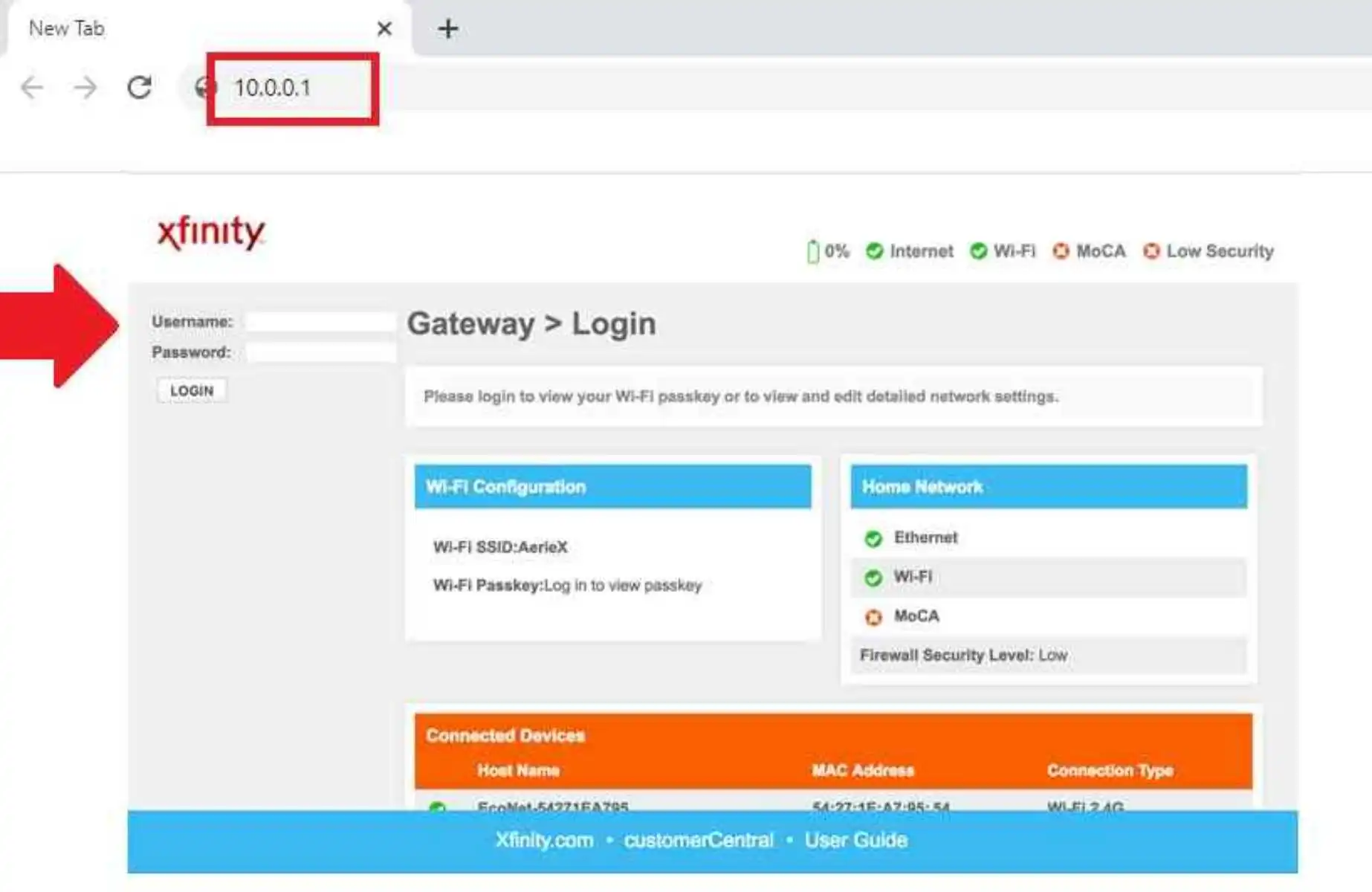
Press the Login button to access router settings and follow further steps to setup.
The first thing you should update is wireless settings to secure your home internet from unauthorized access.
Change Xfinity SSID and Password
Comcast Router and modem support Dual-band and single-band both type wireless router so if you have dual-band you have to setup 5GHz and 2.4Ghz both band but for old single band modem you will get only 2.4 GHz wireless settings.
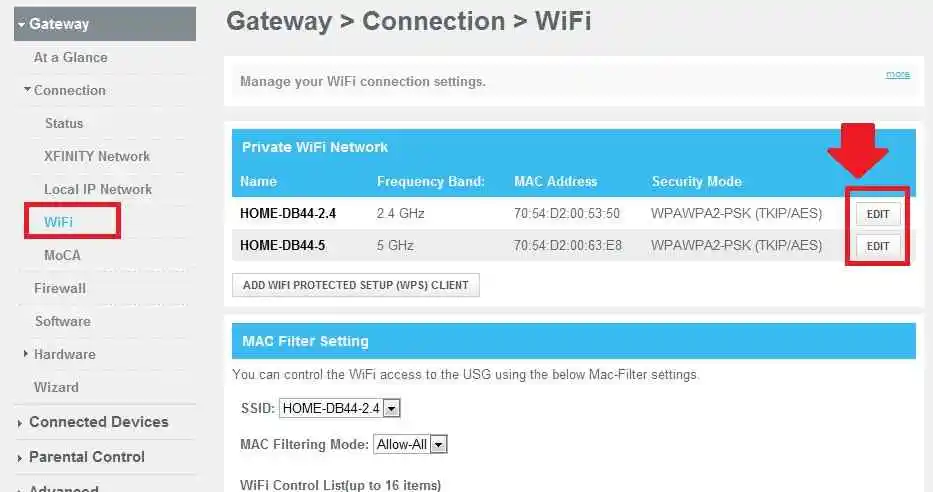
Go to Under Gateway- Connection- WiFi option
Private WiFi Network
2.4GHz and 5Ghz.
Press the Edit button one by one to change the Wireless name and create new WiFI security for both bands.
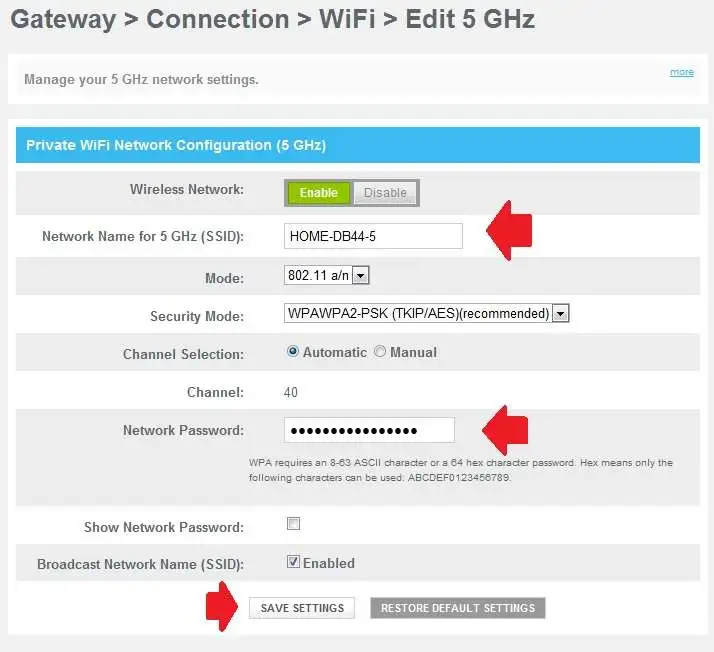
Private WiFi Network Configurations
Wireless Network- Enabled
Network Name for 5GH(SSID) – Create a WiFi name for your WiFi network.
Security Mode– WPAWPA2
Channel selection– Automatic.
Network Password- Create a stronger WiFI security key that easy to remember and hard to gues.
Save settings and the router will reboot while saving settings.
You may be disconnected for WiFi if using a wireless connection to access router settings. Connect again with new WiFi name and password.
Xfinity Login Troubleshooting
Fix the login issue you may getting while trying to access your Comcast cable modem using wired or wireless connections.
10.0.0.l Comcast Login IP Networking
There are many reasons due to the site cant reach or login IP address taking too long time to respond. You can fix login issues using step-to-step troubleshooting. Follow the st.eps below to fix the login issue with 10.0.0.0.l.
- First, make sure the default Xfinity login IP 10.0.0.01 has already not changed with a new IP or different series during the first-time setup
- If you are using a WiFi connection to access the 10.O.O.1 IP address make sure you are connected to the same residential gateway.
- If using a wired connection make sure you are using a LAN port to access the web interface and the LAN cable should be in working condition.
- While accessing the IP address to the browser check using the proper IP format http://10.0.0.1 instead of using the wrong IP format 10.0.0.1 piso wifi, http// 10.0.0.1, 10.0.0.0.1, 10.0.01 or 10 0.1 will redirect to error page only.
- If still IP address taking too long time to respond then check if any firewall, network tools, or antivirus blocking the Xfinity Login page.
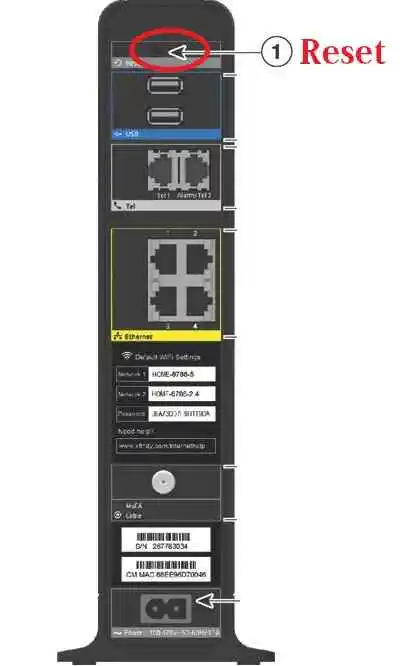
Factory reset Xfinity Residential Gateway
You can factory reset the Xfinity router if you forget your login username or password after a change during the first time setup or can’t connect to 10.0.0.1 login IP address while accessing from a mobile or laptop.
Note: Making reset from reset button will be earse all configuration and you have to setup residential gateway again as per your comcast internet settings. Only make factory reset if you have all configuration details or configuration backup file to restore after reset router.
Steps to factory reset Xfinity
- Locate a small reset switch in the Xfinity cable modem or wireless router.
- Press and hold the reset button for 10-15 seconds and release when modem LEDs turn off and turn ON again.
- Gateway will automatically reboot after reset execution.
- This process may take a few minutes so do not disturb the power to avoid damage.
Hope this simple login manual help you to understand how to access Xfinity router from the web browser using the default login IP address and username password in factory modes.
Login guide IP address 10.0.0.0.1 step by step
Related Post
- 10.1.10.1 Admin login Username and Password
- 192.168.100.100 Login Username and Password
- 192.168.1.1 & 192.168.l.l Admin Login Password
- 192.168.1.0 Admin Login Router